
There is one rule that decides a game server purchase: because game servers do most of their work on a single core, what matters is not core count but the processor's clock speed and generation — and what defines player experience is not average performance but latency in the worst moments. RAM crashes the server when it runs out, but once you have enough, more of it does not raise TPS. This guide covers how much capacity FiveM, Minecraft, MTA and TeamSpeak actually need, what to check on location and DDoS protection, and the difference between a managed panel and your own server.
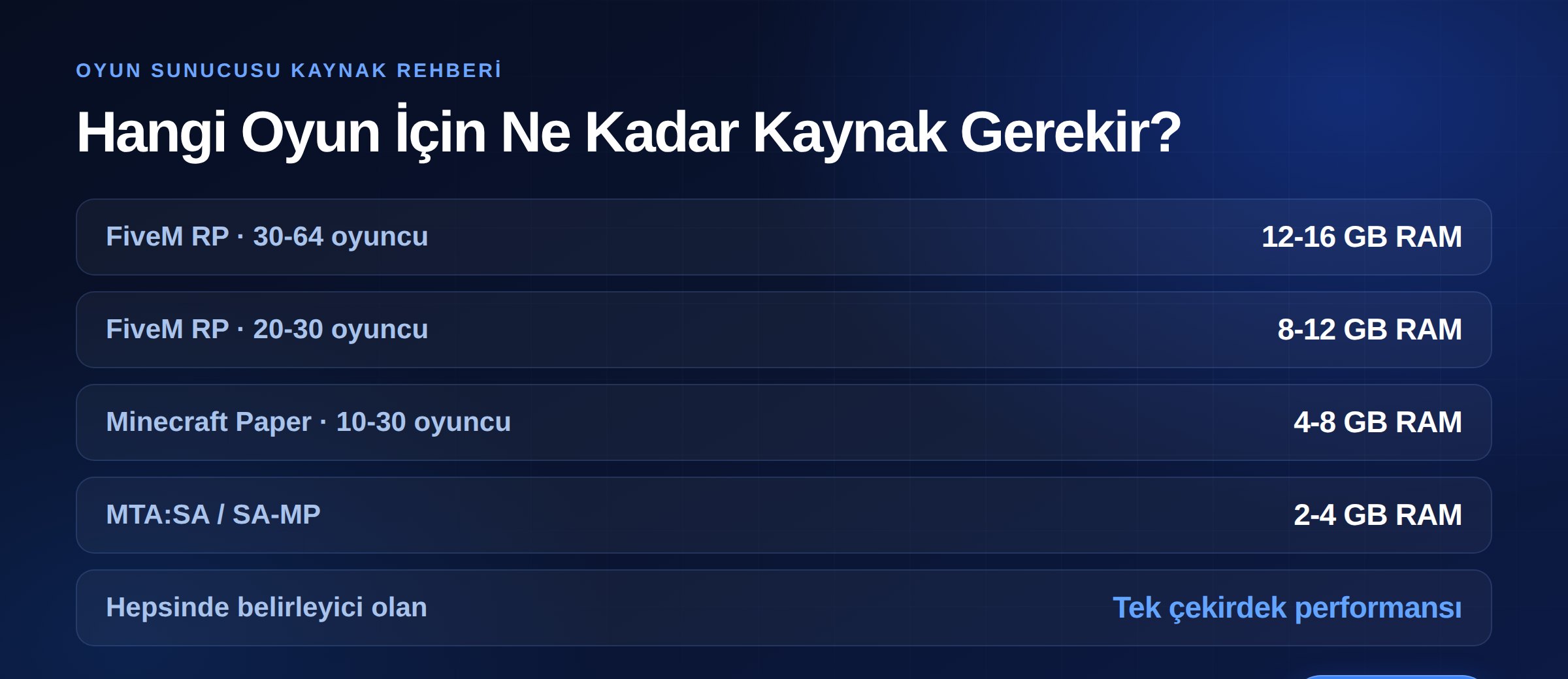
Requirements vary sharply by game. The ranges below are practical starting points by concurrent player count.
The most demanding category, because load comes not only from players but from loaded resources and custom assets.
An empty server uses around 2–3 GB; the rest is determined by the scripts and assets you load. Because FiveM runs largely on one thread, clock speeds above 4.5 GHz and a large L3 cache make a visible difference. Current-generation processors such as the AMD Ryzen 9 9950X fit this profile.
For detailed sizing and settings, see our Minecraft server buying guide.
Comparatively light: a typical install runs comfortably on 2–4 GB RAM, with most load generated by scripts. We covered sizing and latency tuning in how much RAM an MTA server needs and how to lower ping on an MTA server.
The lightest on CPU and RAM, but with different network behaviour: bandwidth scales not with user count but with the number of simultaneous speakers. In a ten-person channel with one speaker, the server relays to nine people; with two speakers, that figure doubles. What matters on a voice server is therefore not RAM but upload capacity and jitter.
The most expensive reflex among new server owners is upgrading RAM the moment lag appears. Adding RAM helps only if you were genuinely memory-starved. As one guide puts it: adding RAM to a server with a slow CPU is like adding fuel tanks to a car with a broken engine.
The real bottlenecks on game servers are:
So the first question when choosing a server is not "how many GB of RAM" but "which processor model and generation, and are the cores reserved for me".
On a game server, consistency beats average speed. If another customer on the same physical machine starts a backup or takes an attack and your server slows down, your players experience it as rubber-banding and lag.
That makes reserved resources more important than the numbers on the spec sheet. Checking is easy: run top on Linux and read %st (steal time) on the CPU line. Consistently above 10% during busy hours means the physical host is overloaded and your TPS is not in your hands. We covered the whole topic in our guide on the difference between VDS and VPS.
If your player base is in Turkey, hosting in Turkey saves 40–60 ms on every packet compared with overseas locations. No script optimisation and no RAM upgrade recovers that, because the cause is distance, not software.
In competitive games and roleplay servers players feel this directly and choose servers accordingly. Serving a domestic audience from abroad hands your competitors a structural advantage.
Game servers are among the most heavily targeted categories. Current industry data puts gaming at roughly 19% of DDoS attacks, and 56% of network-layer attacks are UDP floods.
Why does that matter? Because game traffic runs largely over UDP, and conventional web protection does not cover UDP. The right questions for a provider are not "how many Gbps" but:
Null-routing is not a protection method: the attack stops because your server stops too. We explained what Gbps figures mean in practice in our DDoS protection capacity guide, and why Cloudflare is not enough for game servers in does Cloudflare protect game servers.
There are two ways to rent a game server:
One-click setup, a ready interface, low barrier to entry. Reasonable for small communities and first-time owners. In exchange you are limited on Java versions, JVM flags, installing additional services and running multiple instances.
Full control: you decide the operating system, versions, firewall, backup scheme and how many game servers to run. If you plan multiple worlds, a proxy network (BungeeCord/Velocity), a separate database or bots, it is the only sensible option. In exchange, system administration is yours.
Ask yourself this: a year from now, how many servers and services will you be running? If the answer is more than one, your own server is cheaper from the start.
A serious game server is advertised with a domain, not an IP. In Minecraft an SRV record lets players connect using the domain alone, without a port; in FiveM and other games, using a domain matters for permanence and brand perception.
You will find every DNS record type in our DNS records guide, and you can register your domain from our domain search page. All registrations include free WHOIS privacy.
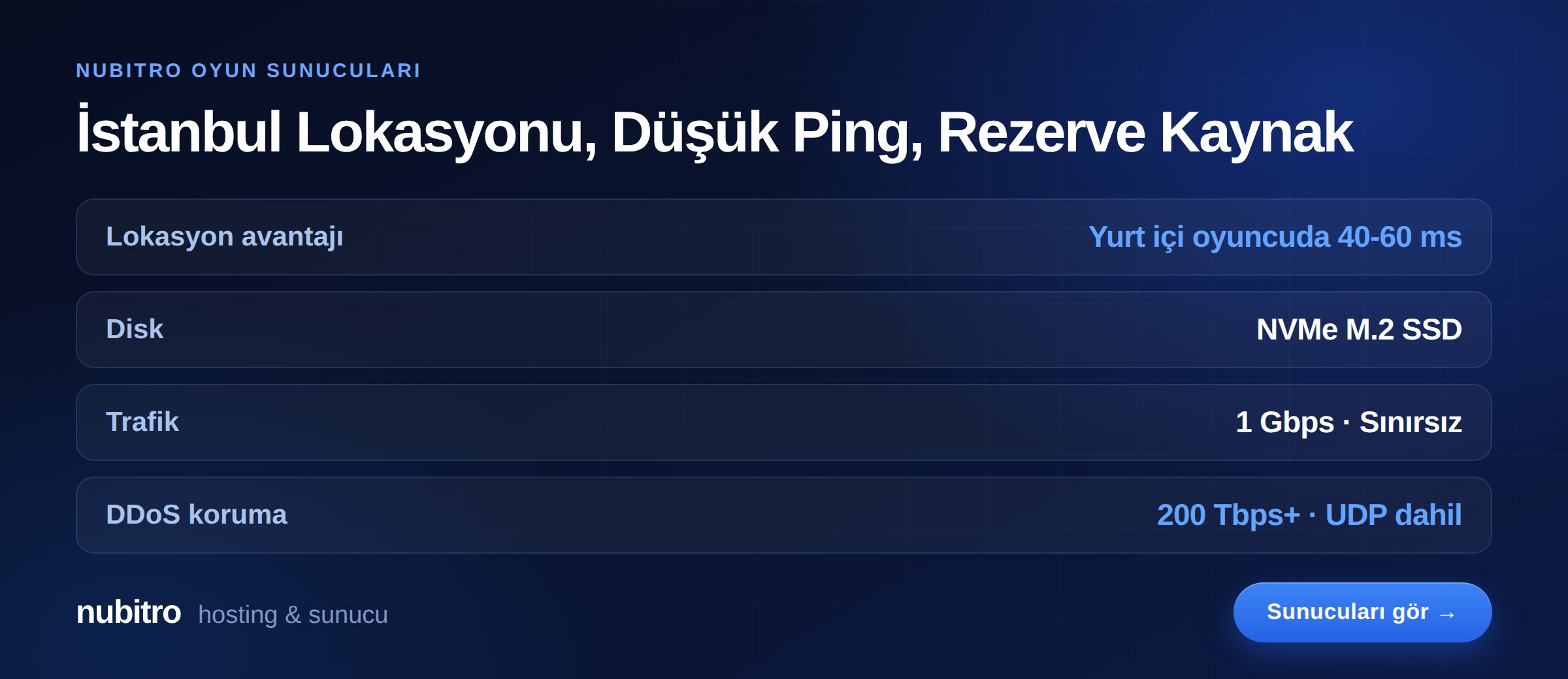
Nubitro game servers run in Istanbul, Turkey on AMD Ryzen 9 9950X processors with NVMe M.2 SSD storage and 1 Gbps unmetered traffic. The infrastructure carries 200 Tbps+ DDoS protection as standard, and because resources are assigned through hardware partitioning, neighbour load does not reach your TPS.
Our per-game plans: FiveM servers, Minecraft servers, MTA servers and TeamSpeak 3 servers. To build your own configuration, see Ryzen VDS plans, or dedicated servers for higher capacity.
To see everything on one page, visit the Nubitro homepage.
For a mid-sized RP setup, 12–16 GB RAM is a reasonable starting point, but the real driver is how many resources you load. Above 100 resources, plan for 20 GB or more. On the CPU side, high clock speed is essential.
For game servers, clock speed. FiveM and Minecraft run largely on one thread; extra cores help with background tasks and running multiple instances.
Because memory probably was not the problem. Measure single-core load, entity counts and database query times first. In Minecraft, lowering simulation-distance alone often solves it.
Because game experience is defined by the worst moment, not the average. A brief freeze once a minute caused by neighbour load never shows in average graphs but is felt instantly by players.
Standard Cloudflare services are for HTTP/HTTPS traffic. Since game servers mostly use UDP, that protection does not cover game ports. A game server needs network-level protection that includes UDP.
Look at tick time rather than player count. Once the server starts exceeding its per-tick budget, adding players degrades the experience; at that point you need either optimisation or a network split across instances.
%st. Turkey (Türkçe)
 Worldwide (English)